Headless WooCommerce: How to Make Your WooCommerce Store Faster Without Rebuilding Everything
A lot of WooCommerce stores start out fast. You launch with a clean theme, a handful of products, and everything feels snappy.
Then a few years pass. You’ve added more products, a couple of marketing plugins, a review widget, a few tracking scripts for ads and analytics, and maybe a theme customisation or two that “just needed to go live quickly.” None of it was a bad decision on its own. But together, it adds up.
Now the store works — orders come in, customers check out — but it feels heavier than it used to. Pages take a beat longer to load. Mobile feels sluggish. And the idea of rebuilding the whole thing from scratch sounds exhausting, expensive, and honestly unnecessary.
So here’s a fair question: what if you didn’t have to replace WooCommerce at all? What if you could keep it running the backend of your store — products, orders, payments, everything — and just give customers a faster, more modern frontend to shop on?
That’s the basic idea behind headless WooCommerce, and it’s worth understanding even if you’re not a developer.
A Simple Example: An Old WooCommerce Store
Let’s imagine a store called ClassicHome Store. It sells home décor and furniture, has grown to over 1,000 products, and has been live for about six years.
Over time, it’s picked up:
- An older WooCommerce theme that was customised heavily early on
- A dozen or so plugins for filtering, reviews, shipping calculators, and popups
- Product filters that let customers narrow by category, colour, size, and price
- Payment and shipping integrations
- Analytics and ad tracking scripts
- A review system
- A few marketing tools for email capture and upsells
Individually, every one of these made sense at the time. Together, they’ve made the frontend heavier than it needs to be.
Here’s what a typical customer journey looks like: they search on Google, land on the homepage, click into a category, open a product page, add it to cart, and head to checkout. If each of those steps loads a little slower than it should — especially on mobile — that friction adds up. Product filtering feels laggy. Pages take longer to become interactive. The design, while functional, starts to feel dated next to newer competitors.
To be clear, this isn’t true of every WooCommerce store. Plenty of well-optimised, lightly-plugged-in stores run just fine. But it’s a common pattern for stores that have grown organically over several years without a frontend refresh.
What Is Headless WooCommerce?
In a traditional WooCommerce setup, everything runs through one system: the customer interacts with your WordPress theme, which is directly connected to the WooCommerce backend that manages your store.
Customer → WordPress/WooCommerce Theme → WooCommerce Backend
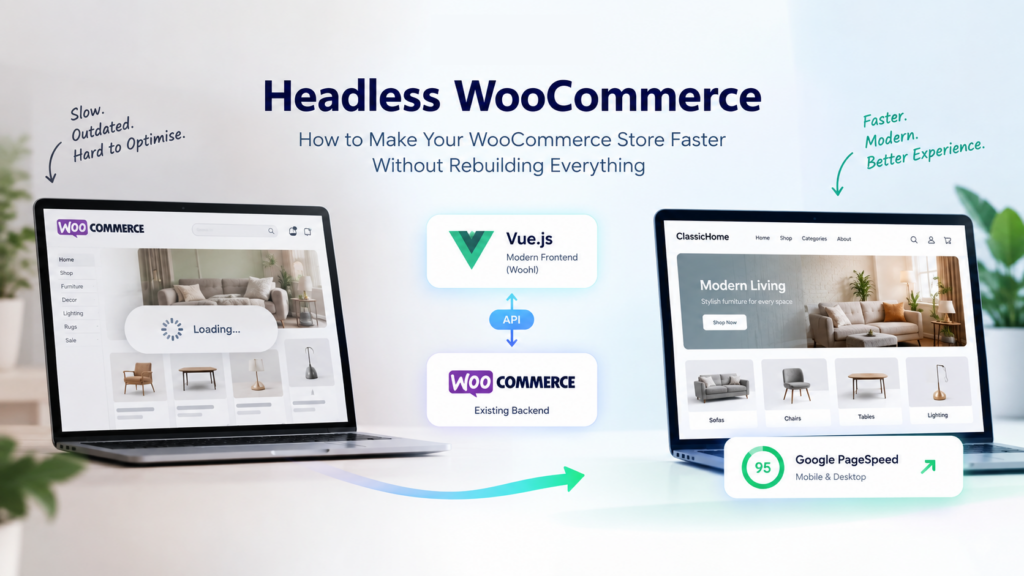
Headless WooCommerce separates that connection. Instead of the theme handling everything, you introduce a modern frontend that talks to WooCommerce through an API, rather than through the theme layer itself.
Customer → Modern Frontend → API → WooCommerce Backend
“Headless” simply means the part customers see (the frontend) is decoupled from the part that manages your store (the backend). WooCommerce keeps doing what it’s good at — handling products, orders, inventory, coupons, shipping, taxes, payments, and general store management. You’re not touching any of that. What changes is how customers actually experience your store when they land on it.
Why Would a WooCommerce Store Need a Headless Frontend?
The honest answer is: not every store does. But there are practical reasons some businesses look into it.
Performance. A modern frontend, built with fewer dependencies on legacy theme code, generally loads faster and feels more responsive.
More control over the customer experience. You’re not limited by what a theme framework allows — you can design the storefront closer to how you actually want it to look and behave.
Mobile experience. Since a large share of ecommerce traffic is mobile, a lighter, faster-loading frontend tends to matter more there than on desktop.
Flexibility. Custom shopping experiences — unique product configurators, tailored category pages, specific checkout flows — are often easier to build when the frontend isn’t tied to WordPress theme constraints.
Reduced frontend overhead. You can strip away a lot of the accumulated weight (unused theme features, redundant scripts) without touching your actual store data.
That said, headless isn’t automatically the right move for everyone. If you’re running a smaller catalogue on good hosting with a clean, well-optimised theme, you may already have a fast site — and a headless rebuild could be more effort than it’s worth. It’s a tool for a specific kind of problem, not a universal upgrade.
Where Vue.js Fits In
If you’ve read anything about headless ecommerce, you’ve probably seen Vue.js mentioned as a common frontend framework. You don’t need to understand the technical details, but the basic split is useful to know:
WooCommerce handles the ecommerce engine — the backend. Vue.js handles the storefront customers actually browse and shop on — the frontend. An API connects the two, passing product data, inventory, and orders back and forth.
A simple way to think about it: WooCommerce is the kitchen, and the Vue.js frontend is the dining room customers actually sit in. The kitchen keeps doing what it’s always done. The dining room is what determines how pleasant the experience feels.
Where Woohl Fits Into This
This is where a tool like Woohl becomes relevant. Building a custom Vue.js storefront from scratch is a real project — it takes development time, ongoing maintenance, and a team that understands both WooCommerce’s API and modern frontend frameworks. That’s not realistic for every store.
Woohl takes a more packaged approach: it converts an existing WooCommerce store into a Vue.js-powered frontend, while WooCommerce continues to run as the backend. Rather than building the storefront layer yourself, Woohl acts as the plugin layer that connects your existing store data to a modern frontend through the API — aiming for a simpler, more accessible path into headless WooCommerce.
To be fair, it’s not a magic fix for every performance issue a store might have. Things like image weight, third-party scripts, and hosting still matter. But it does remove a lot of the heavy lifting involved in going headless in the first place.
How Woohl Works, in 3 Steps
Step 1: Create your Woohl account.
You sign up and get access to the platform where your storefront will be configured.
Step 2: Connect your WooCommerce store.
WooCommerce stays exactly where it is, doing exactly what it’s always done — managing products, orders, and store operations. Woohl connects to it via the API.
Step 3: Launch the Vue.js storefront.
Customers now interact with the new, faster frontend, while WooCommerce keeps running the backend behind the scenes.
The flow looks like this:
Customer → Vue.js Storefront (Woohl) → API → WooCommerce Backend
Before vs After: ClassicHome Store
Going back to our earlier example — here’s roughly what that transition looks like.
Before
Old WooCommerce theme → multiple frontend scripts → slower product pages → weaker mobile experience
After
Vue.js storefront → Woohl → WooCommerce backend → products, orders, inventory, and checkout still running as usual underneath
The store’s actual operations don’t change. What changes is the layer customers interact with directly.
What About PageSpeed?
This is a fair thing to ask about, and worth being straightforward on. Woohl markets the ability to reach 90+ Google PageSpeed scores on mobile and desktop. That’s a meaningful benchmark, but it’s not something that applies automatically to every store the moment it goes headless.
Actual PageSpeed results still depend on a mix of factors: how much content and how many images your store has, what third-party scripts and integrations you’re running, your hosting setup, and how the frontend itself is configured. A headless architecture gives you more room to optimise for performance — it removes a lot of the legacy theme weight that typically drags scores down — but the final number still depends on how everything is set up.
The real takeaway is control, not a guarantee. A modern frontend gives you more levers to pull when you’re trying to improve site speed.
Is Headless WooCommerce Right for You?
It’s worth exploring if:
- Your WooCommerce site feels noticeably slow, especially on mobile
- Your mobile experience is holding back conversions
- Your current theme has become difficult or risky to update
- You’re running a large number of plugins that have piled up over time
- You want a more customised, distinctive frontend experience
- Your theme limits what you can actually do with the customer experience
- You want to modernise the storefront without abandoning WooCommerce
On the other hand, if your site already loads quickly, your theme is lightweight and well-maintained, and your catalogue is modest, a full headless setup might be more than you need right now. Sometimes the better move is theme optimisation or hosting improvements rather than an architectural change.
CzarGroup + Woohl
CzarGroup works across ecommerce development, including WooCommerce and modern headless technologies. Not every store needs the same fix — some need theme optimisation, some need custom development work, and some are genuinely good candidates for a headless setup.
If you’re weighing your options, it’s worth evaluating a few paths: WooCommerce performance optimisation, theme improvements, fully custom development, a headless WooCommerce build with Vue.js, or a more packaged solution like Woohl for a faster path to a headless frontend.
Conclusion
You don’t always need to tear down and rebuild your WooCommerce store to make it faster and more modern. A headless approach lets you keep WooCommerce doing what it does well on the backend, while introducing a frontend that’s built for speed and flexibility.
Woohl is one option for businesses that want a more straightforward path toward a Vue.js-powered WooCommerce storefront — without taking on a full custom build.
Want to see what a faster WooCommerce storefront could look like? Explore Woohl at woohl.dev.
FAQ's
Frequently Asked Questions
Headless WooCommerce is a setup where the customer-facing frontend is separated from the WooCommerce backend. WooCommerce continues to manage products, orders, inventory, and payments, while a modern frontend — often built with a framework like Vue.js — handles what customers actually see and interact with, connected via an API.
No. Going headless doesn't mean replacing WooCommerce. Your backend — products, orders, payments, and store management — stays exactly as it is. Only the frontend layer changes, which is why tools like Woohl focus on adding a faster storefront rather than migrating your entire store.
In most cases, yes — a modern frontend removes a lot of the legacy theme and plugin weight that slows pages down. However, actual speed still depends on factors like image size, hosting, and third-party scripts, so results vary from store to store.
Not necessarily. Stores with a small catalogue, good hosting, and a lightweight, well-optimised theme may already run fast enough without going headless. It tends to make the biggest difference for stores with heavy plugin stacks, outdated themes, or slow mobile performance.
Woohl is a tool that converts an existing WooCommerce store into a Vue.js-powered frontend while keeping WooCommerce as the backend. It's designed to simplify the move to headless WooCommerce without requiring a custom-built storefront from scratch.